26. Autoevaluación.

Después de tantos post y tanta información llega el momento de medir si los conceptos han sido asimilados.

Vas a tener la posibilidad de autoevaluarte con estas preguntas en las que hay 4 respuestas con una sola opción correcta.

Apenas te llevará media hora, es un test fácil, adelante…

La ecografía es…

  1. Una radiación ionizante que aprovecha las propiedades acústicas de la materia.
  2. Una radiación no ionizante que aprovecha las propiedades aéreas de la materia.
  3. Una radiación no ionizante que aprovecha las propiedades acústicas de la materia.
  4. Ninguna es correcta.

https://ecografiafacil.com/2017/11/23/que-es-la-ecografia/

¿Dónde se produce el efecto piezoeléctrico?

  1. En el monitor del ecógrafo.
  2. En el transductor.
  3. En las interfases.
  4. En los tejidos.

https://ecografiafacil.com/2017/12/22/8-la-piezoelectricidad/

Clasifica los sonidos según su frecuencia. Señala la correcta.

  1. INFRASONIDOS: entre 0 y 20 KHz.
  2. SONIDOS AUDIBLES: entre 20 Hz y 20 MHz.
  3. ULTRASONIDOS: entre 20 KHz y 1 GHz ( 1 GHz = 109 Hz).
  4. HIPERSONIDOS: a partir de 100 GHz.

https://ecografiafacil.com/2017/12/08/3-clasificando-los-ultrasonidos/

Señala la correcta respecto del concepto del ultrasonidos:

  1. El ultrasonido es capaz de arrancar electrones de la órbita.
  2. El ultrasonido tiene frecuencias inferiores a los sonidos audibles.
  3. La onda de ultrasonido es sinusoide con áreas de rarefacción y compresión.
  4. b y c son correctas

https://ecografiafacil.com/2017/12/13/3-la-onda-ultrasonica-caracteristicas/

De modo general el US se propaga en el cuerpo humano a una velocidad de:

  1. 331 m/s
  2. 1450 m/s
  3. 1540 m/s
  4. 4080 m/s

https://ecografiafacil.com/2017/12/15/5-magnitudes-de-la-onda-otras-magnitudes/

La frecuencia en ecografía se define como:

  1. Número de ciclos que se producen por unidad de tiempo.
  2. Número de sondas por segundo.
  3. Es la máxima distancia que se desplaza una molécula desde su estado normal.
  4. Es la distancia de una compresión a la siguiente.

https://ecografiafacil.com/2017/12/14/4-magnitudes-de-la-onda-ultrasonica-la-frecuencia/

Define longitud de onda…

  1. Número de ciclos que se producen por unidad de tiempo.
  2. Es la máxima distancia que se desplaza una molécula desde su estado normal.
  3. Distancia entre dos puntos correspondiente de una curva de presión.
  4. Ninguna es cierta.

https://ecografiafacil.com/2017/12/15/5-magnitudes-de-la-onda-otras-magnitudes/

Respecto de la impedancia acústica, di la correcta:

  1. Es la resistencia del medio a la propagación de la onda sonora.
  2. Los sólidos tienen una alta impedancia, y los líquidos, partes blandas y gases tienen una baja impedancia.
  3. El gas transmite muy mal el ultrasonido.
  4. Todas son ciertas.

https://ecografiafacil.com/2017/12/17/6-interaccion-del-haz-ultasonico-y-la-materia/

¿Qué efectos aparecen en una interfase? Señala la correcta.

  1. Reflexión, relajación y excitación.
  2. Atenuación, relajación y excitación.
  3. Refracción, relajación y excitación.
  4. Calor.

https://ecografiafacil.com/2017/12/19/7-las-interfases/

¿la zona de mayor utilidad para la ecografía, respecto del haz ultrasónico, es?:

  1. Zona Focal.
  2. Fraunhofer.
  3. Fresnel
  4. b y c son correctas.

https://ecografiafacil.com/2017/12/23/9-el-haz-ultrasonico/

¿Qué  sonda ecográfica usaremos en un estudio normal de Abdomen?

  1. Cónvex
  2. Lineal
  3. Intracavitaria
  4. Sonda lápiz

https://ecografiafacil.com/2018/01/01/11-tipos-de-transductores/

¿Qué  sonda ecográfica usaremos en un estudio normal de Tiroides?

  1. Cónvex
  2. Lineal
  3. Intracavitaria
  4. Sonda lápiz

https://ecografiafacil.com/2018/01/01/11-tipos-de-transductores/

¿Qué  sonda ecográfica usaremos en un estudio normal de Cadera Pediátrica?

  1. Cónvex
  2. Lineal
  3. Intracavitaria
  4. Sonda lápiz

https://ecografiafacil.com/2018/01/01/11-tipos-de-transductores/

El Modo B o 2D es:

  1. Modulación de amplitud.
  2. Modulación de brillo.
  3. El modo más usado en medicina.
  4. b y c son correctas.

https://ecografiafacil.com/2018/01/07/14-parametros-tecnicos-los-modos-de-trabajo/

La Ganancia General es:

  1. Capacidad que tenemos de modificar el contraste de la imagen.
  2. Capacidad que tenemos de modificar el brillo de toda la imagen.
  3. Es la modulación de la amplitud del ultrasonido.
  4. b y c son las correctas.

https://ecografiafacil.com/2018/01/10/15-la-ganancia-general/

Respecto del Foco o Enfoque señala la falsa:

  1. Aumentamos la nitidez en la línea donde lo situemos.
  2. Es un comando dependiente del Técnico que esté realizando la ecografía.
  3. Los equipos modernos son monofocales.
  4. Es vital su uso para una correcta visualización de la estructura a estudio.

https://ecografiafacil.com/2018/01/18/19-el-foco/

¿En ecografía médica si aumentamos la frecuencia en un estudio…?

  1. Obtendremos menos profundidad, pero obtendremos más nitidez.
  2. Obtendremos más profundidad, pero obtendremos menos nitidez.
  3. Obtendremos menos profundidad y obtendremos menos nitidez.
  4. Obtendremos más profundidad y obtendremos más nitidez.

https://ecografiafacil.com/2018/01/24/21-la-frecuencia/

Del Rango Dinámico depende…

  1. El brillo de la pantalla.
  2. Depende el contraste de la pantalla.
  3. Depende la nitidez de la imagen.
  4. a y b son correctas.

https://ecografiafacil.com/2018/02/02/23-el-rango-dinamico/

Usaremos el armónico cuando…

  1. La imagen fundamental no es buena.
  2. Es recomendable cuando hay muchas interfases.
  3. La imagen armónica procesa ecos generados por la imagen fundamental.
  4. Todas son correctas.

https://ecografiafacil.com/2018/01/29/22-los-armonicos/

La Potencia de transmisión del ecógrafo:

  1. tiene que ver con el criterio ALARA.
  2. Tiene que ver con el IM.
  3. Tiene que ver con la calidad de la imagen.
  4. Todas son correctas.

https://ecografiafacil.com/2018/02/04/24-la-potencia-de-transmision/

Espero que hayas disfrutado. En cada pregunta tienes el enlace para que busques la respuesta correcta.


25. Otros Ajustes o Parámetros.

Hemos estudiado hasta aquí los parámetros más importantes del manejo de un ecógrafo, todos ellos eslabones vitales de una cadena sin la que es imposible conseguir una imagen diagnóstica en modo 2D.

Existen, sin embargo, gran cantidad de cantidad de ajustes o parámetros que son, desde mi punto de vista, menos importantes. ¿Porqué?, te preguntarás, te explico:

1.- Estos parámetros no aparecen en la botonera, suelen estar en el submenú.Y su uso es ocasional, en ocasiones de uso excepcional.

2.- Dependen de cada casa comercial, es decir, cada marca implementa en sus equipos una serie de ajustes para optimizar la imagen, por ejemplo, filtros, escalas de grises y otros que lo que hacen es modificar la imagen ligeramente, a veces, de manera casi imperceptible, por lo que, según mi opinión y para ti que estás empezando, pierden un poco de valor. Cuando ya estemos muy sueltos con el manejo de los equipos podemos empezar a trastear con estos otros comandos.

Eso no quiere decir que no los tengas que conocer, y por eso te presento alguno de ellos:

De estos ajustes «menos importantes», vamos a ver el primero que es el más importante de los menos importantes:

La Persistencia. Ojo, este ajuste puede variar de denominación según cada marca, pero sus efectos en la imagen son estos:

  • Lo que conseguimos con este ajuste es obtener una imagen más suave al aumentar este valor.
  • Elimina el moteado aleatorio.
  • Lo que estamos haciendo es controlar el tiempo que cada imagen permanezca en la pantalla antes de cambiarla por la siguiente.
  • Una imagen sin persistencia tendrá mucho grano.
  • Si la persistencia es demasiado alta la imagen estará “borrosa”

El Contorno: Ojo, este ajuste puede variar de denominación según cada marca, pero sus efectos en la imagen son estos:

  • Con este parámetro controlamos el tamaño del pixel.
  • Al aumentar el contorno aumentamos el pixel.
  • Si aumentamos el contorno mejoramos la diferenciación, pero ojo, si aumentamos en exceso podemos encontrar una imagen con demasiado grano.

Mapa o Escala de grises:

  • Son las distribuciones de la escala de grises.
  • Tendremos mapas muy contrastados, otros con más blancos, más suaves, etc.
  • Suele estar en todas las marca, pero su uso es residual.
We have studied until now the most important parameters of the handling of an ultrasound, all of them vital links of a chain without which it is impossible to obtain a diagnostic image in 2D mode. There are, however, a large amount of adjustments or parameters that are, from my point of view, less important. Why ?, you ask, I explain:
1.- These parameters do not appear in the keypad, they are usually in the submenu.And their use is occasional, sometimes of exceptional use.
2.- They depend on each commercial house, that is, each brand implements a series of adjustments in its equipment to optimize the image, for example, filters, gray scales and others that what they do is modify the image slightly, sometimes, almost imperceptibly, so, in my opinion and for you that you are starting, they lose a bit of value. When we are already very loose with the management of the equipment we can start to mess with these other commands. That does not mean that you do not have to know them, and that’s why I present one of them: Of these «less important» adjustments, we will see the first that is the most important of the least important:
Persistence Beware, this setting may vary in denomination according to each brand, but its effects on the image are these: What we achieve with this setting is to obtain a smoother image by increasing this value. Eliminate random speckle. What we are doing is controlling the time that each image remains on the screen before changing it for the next one. An image without persistence will have much grain. If the persistence is too high the image will be «blurry»
The Outline: Eye, this setting may vary in denomination according to each brand, but its effects in the image are these: With this parameter we control the size of the pixel. When increasing the contour we increase the pixel. If we increase the contour we improve the differentiation, but beware, if we increase in excess we can find an image with too much grain.
Map or Grayscale: They are the distributions of the gray scale. We will have very contrasted maps, others with whiter, softer, etc. It is usually in all brands, but its use is residual
Mínimos cambios en la imagen.

Tinte:

  • Es el cambio del color de la imagen.Nos puede mostrar cambios sutiles en el tejido que quizás no veríamos con la escala de grises…Hay tonos azules, Sepia, Rojo, etc.
  • Suele estar en todas las marca, pero su uso es residual.
Dye: It is the change of the color of the image. It can show us subtle changes in the fabric that perhaps we would not see with the grayscale … There are blue tones, Sepia, Red, etc. It is usually in all brands, but its use is residual.
Tinte azul.

Campo visual:

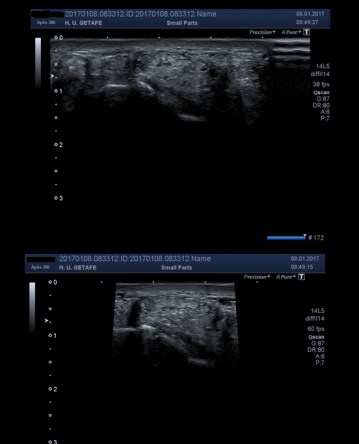
  • Modificamos la anchura de la imagen, menos campo visual, más imagen de refresco, más imágenes por segundo en nuestra pantalla.
  • Tiene que ver con la huella del transductor, es decir, la medida que tiene, no siempre necesitamos toda la huella de la sonda para estudiar una estructura. Por ejemplo en las imágen siguientes.
Visual field or Scan Range
We modify the width of the image, less visual field, more refresh image, more images per second on our screen. It has to do with the trace of the transducer, that is, the measurement it has, we do not always need the entire trace of the probe to study a structure. For example in the following images.
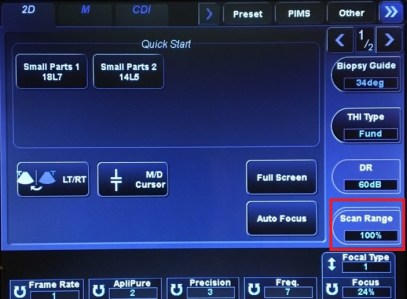
Scan Range de 100%.
Imagen superior Scan Range 100%, Inferior, 50%.

Otros:

Realce de bordes: Incrementa el contraste entre diferentes interfases.

Suavizado: Suaviza la imagen, reduciendo el ruido global.

Rechazo: Umbralización para incrementar el contraste.

Recuerda, cada fabricante implementa los suyos y hay muchísimos. Los importantes están bien explicados, pero cuando te pones delante de un ecógrafo hay que conocer los importantes y los no tan importantes y para eso tenemos un técnico de aplicaciones que nos va a instruir en todos aquellos ajustes que su marca haya instalado en el modelo de ecógrafo con el que tengamos que trabajar. Quiero destacar aquí su gran labor porque conocen el ecógrafo al dedillo.

Con este post terminamos el estudio de los parámetros, a partir de ahora, nuestro objetivo va a ser la imagen de ecografía. Te espero.

Others:
Edge enhancement: Increase the contrast between different interfaces.
Smoothing: Softens the image, reducing overall noise.
Rejection: Threshold to increase the contrast.
Remember, each manufacturer implements their own and there are many. The important ones are well explained, but when you put yourself in front of an ultrasound scanner you have to know the important ones and the not so important ones and for that we have an application technician who will instruct us in all those adjustments that your brand has installed in the model of ecograph with which we have to work. I want to highlight here your great work because they know the ecograph at your fingertips. With this post we finish the study of the parameters, from now on, our objective will be the image of ultrasound. I wait for you.

24. La Potencia de Transmisión.

Cuando empecé a hablar de los ajustes ecográficos o los parámetros técnicos, como se prefiera, quizá debería haber empezado por este ajuste, la razón es la siguiente, este ajuste, es el encargado de proporcionar la energía sónica que tiene que atravesar los tejidos y que lo hace partiendo desde el transductor. Sin esta energía, ninguno de los otros parámetros explicados aquí hasta ahora tendrían mucho sentido ya que la imagen, sin una correcta Potencia de Transmisión, no es válida, pero como el orden de los factores no altera el producto…empezamos…

La definición es: Es la potencia eléctrica que le llega a la sonda ecográfica o transductor.

Esta energía que luego, por el Efecto Piezoeléctrico https://ecografiafacil.com/2017/12/22/8-la-piezoelectricidad/ se convertirá en nuestro haz de ultrasonidos. Por tanto, a más energía eléctrica, mi haz será más potente también, pero…

Tiene relación estrecha con el índice mecánico (IM) y el Índice térmico (IT).

Estos índices son ambos efectos biomécanicos del sonido, efectos que requieren su post particular y que estudiaremos más adelante. Estos efectos pueden ser potencialmente dañinos.

La Potencia de Transmisión debe ser siempre ser tan baja como sea posible, según el criterio ALARA. ALARA son las siglas en inglés de «As Low As Reasonably Achievable» es decir “tan bajo como sea razonablemente alcanzable”. De este criterio sabemos muchísimo los Técnicos de Radiología ya que somos los responsables de aplicar estas energías o radiaciones, tanto ionizantes como no ionizantes,a los pacientes.

Por otro lado es necesario que para comprender como funciona la Potencia de Transmisión, entiendas lo que son estos dos índices, así que vamos a explicarlo brevemente.

El IM tiene que ver con el Riesgo de cavitación (aumento de presión y temperatura de las burbujas o cavidades con gas o líquidos). Este IM es un efecto No Térmico. Algunos equipos actuales pueden ocasionar este efecto, potencialmente dañino.

Este índice nunca debe ser superior a 1,9 y además este valor aparecerá en la pantalla para que lo tengamos bajo control.

When I started talking about the echographic settings or the technical parameters, as you prefer, maybe I should have started with this adjustment, the reason is this, this adjustment, is responsible for providing the sonic energy that has to go through the tissues and that it does so starting from the transducer. Without this energy, none of the other parameters explained here would make much sense since the image, without a correct Transmission Power, is not valid, but as the order of the factors does not alter the product … we started … The definition is: It is the electrical power that reaches the sonographic probe or transducer. This energy that then, by the Piezoelectric Effect https://ecografiafacil.com/2017/12/22/8-la-piezoelectricidad/ will become our ultrasound beam. Therefore, the more electrical energy, my beam will be more powerful too, but … It has a close relationship with the mechanical index (IM) and the thermal index (IT). These indices are both biomechanical effects of sound, effects that require their particular post and that we will study later. These effects can be potentially harmful. The Transmission Power must always be as low as possible, according to the ALARA criteria. ALARA stands for «As Low As Reasonably Achievable» that is «as low as reasonably achievable». From this criterion we know a lot Radiology Technicians since we are responsible for applying these energies or radiations, both ionizing and non-ionizing, to patients. On the other hand it is necessary that to understand how the Transmission Power works, understand what these two indexes are, so let’s explain it briefly. The IM has to do with the risk of cavitation (increase in pressure and temperature of bubbles or cavities with gas or liquids). This IM is a Non-Thermal effect. Some current equipment can cause this effect, potentially harmful. This index should never be higher than 1.9 and this value will also appear on the screen so that we have it under control.

El IT es otro valor numérico que indica la capacidad del ultrasonido de aumentar la temperatura del tejido. Este es un valor que marca efectos térmicos.

Se ha demostrado aumentos de 0,2 º Celsius por minuto a ultrasonido entregado a 1 W/cm2 a 1MHz.

Si no se superan 2º C  es difícil que ocasionen efectos.

Ambos valores pueden estar representados en la imagen y deben seguir estas normas:

 – Deben ser claramente visibles en pantalla cuando el valor sobrepase un 0,4.

 – Aquellos equipos incapaces de sobrepasar un índice de 1 están exentos de representar este valor.

 – Pueden estar representado un solo índice (IT o IM) en función del que pueda ocasionar el efecto.

El objetivo es ajustar la potencia para obtener una información clínicamente útil o que la imagen sea diagnóstica, para enternos.

Pero claro, sería lógico pensar que deberíamos reducir esta energía al mínimo, lamentablemente no puede ser porque al reducir la potencia disminuimos la calidad de imagen ya que reducimos la amplitud de señal, sí, otra vez la amplitud, magnitud de onda importantísima.https://ecografiafacil.com/2017/12/15/5-magnitudes-de-la-onda-otras-magnitudes/ 

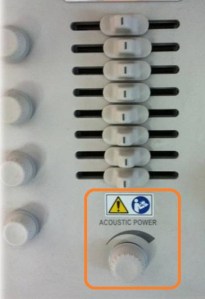
La potencia de transmisión es un ajuste que podemos manejar a través de un comando en forma de rueda, que se encuentra normalmente en la botonera o en el menú táctil en los equipos más nuevos y que en la pantalla se refleja en un porcentaje o en un valor numérico entre el 10 y el 100.

IT is another numerical value that indicates the ability of ultrasound to increase tissue temperature. This is a value that marks thermal effects. It has been shown increases of 0.2 º Celsius per minute to ultrasound delivered at 1 W / cm2 at 1MHz. If they are not exceeded 2 º C is difficult to cause effects. Both values ​​can be represented in the image and must follow these rules: – They must be clearly visible on the screen when the value exceeds 0.4. – Those teams incapable of exceeding an index of 1 are exempt from representing this value. – A single index (IT or IM) can be represented depending on the one that may cause the effect. The objective is to adjust the power to obtain a clinically useful information or that the image is diagnostic, to enternos. But of course, it would be logical to think that we should reduce this energy to the minimum, unfortunately it can not be because when reducing the power we reduce the image quality since we reduce the amplitude of the signal, yes, again the amplitude, important magnitude of the wave.http: //ecografiafacil.com/2017/12/15/5-magnitudes-of-la-onda-otras-magnitudes/ The transmission power is an adjustment that we can manage through a wheel-shaped command, which is normally found in the keypad or in the touch menu in the newer equipment and which is reflected in the screen in a percentage or in a numerical value between 10 and 100.
Potencia de Transmisión, aspecto en botonera.
Potencia de transmisión en menú digital.
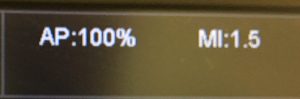
Acustic power del 100 e IM de 1,5.
Valor IM señalado con línea roja.

Si disminuimos este porcentaje, bajamos el valor de los índices antes comentados y también la calidad de imagen, así que ojo…

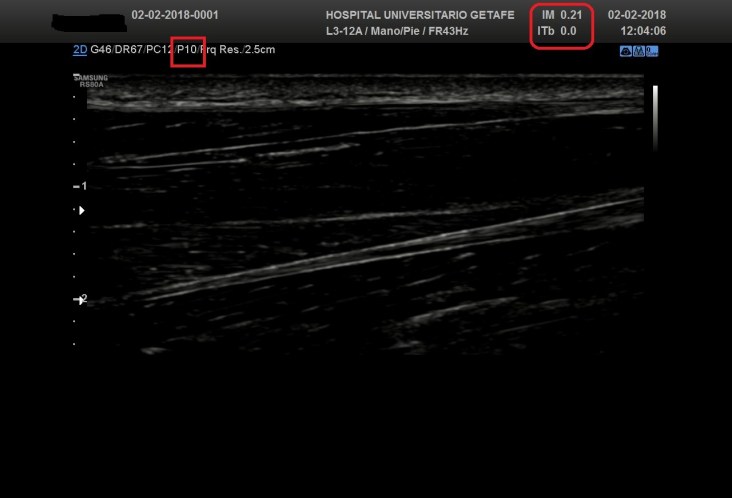
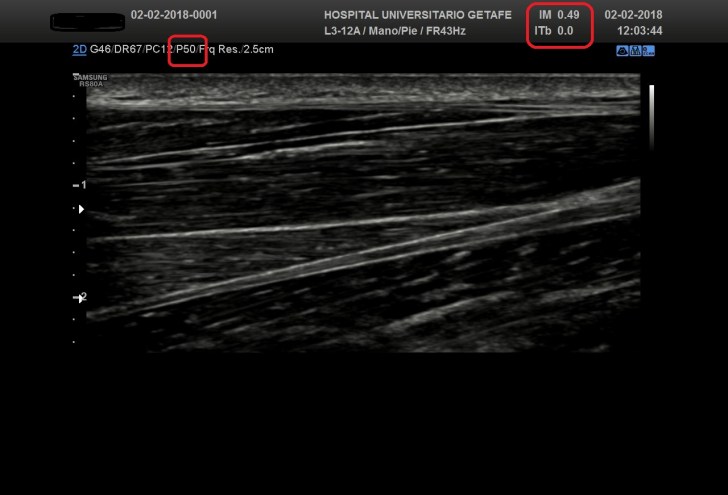
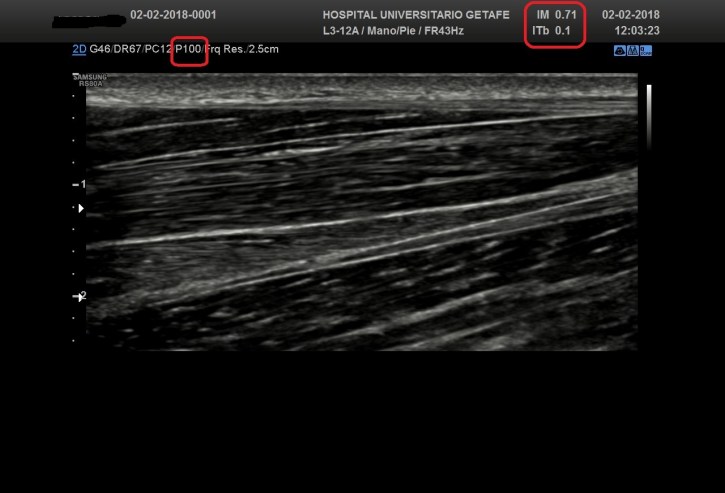
Las imágenes a continuación expuestas nos enseñan como la Potencia influye decisivamente en la calidad de la imagen obtenida y además como los IM e IT se ven afectados según el valor de dicha potencia…observa.

If we decrease this percentage, we lower the value of the aforementioned indexes and also the image quality, so beware … The following images show us how the Power decisively influences the quality of the image obtained and also how the IM and IT are affected according to the value of said power … observe.
Potencia de 10, en rojo, Índices bajos, mala calidad de imagen.
Potencia media (P50), regular calidad de imagen, IM y IT medios.
Potencia máxima (P100), buena calidad de imagen, IM y IT altos, pero dentro de los márgenes de tolerancia.

En el caso de que hagamos una Ecografía con contraste, la potencia de transmisión tiene que estar al mínimo.Normalmente en estos casos, ya viene en la configuración del preset especial para contrates ecográficos que trataremos en un Post más adelante.

In the case that we do an Ultrasound with contrast, the transmission power must be at minimum. Normally in these cases, it already comes in the configuration of the special preset for ultrasound contracts that we will deal with in a Post later.

23. El Rango Dinámico.

El Rango dinámico es un ajuste ecográfico importante desde el punto de vista de la imagen. Es un ajuste que no es de uso extendido por los operadores, ya que es un ajuste que el técnico de aplicaciones nos dejará integrado para cada preseteado cuando nos instala el equipo.

De importancia capital a la hora de tener una escala de grises apropiada en la pantalla.

Es un valor de comprensión y uso amable, porque funciona parecido al contraste de imagen de cualquier televisor, eso sí, en ecografía la imagen es una escala de grises en el modo de trabajo 2D.

Aparece en el menú, a la vista del operador y su conocimiento y uso apropiado da un salto de calidad en la imagen que por ejemplo, el Técnico de Radiología presenta a la radióloga/o.

The dynamic range is an important sonographic adjustment from the point of view of the image. It is a setting that is not widely used by operators, since it is an adjustment that the application technician will leave integrated for each preset when we install the equipment. Of capital importance when it comes to having an appropriate gray scale on the screen. It is a value of understanding and friendly use, because it works similar to the image contrast of any television, however, in ultrasound the image is a gray scale in the 2D working mode. It appears in the menu, in view of the operator and its knowledge and appropriate use gives a leap of quality in the image that for example, the Radiology Technician presents to the radiologist.
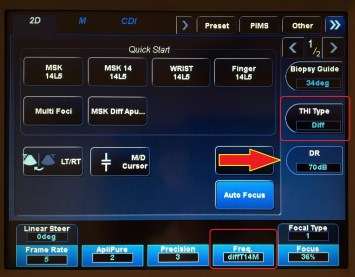
DR con flecha roja.

Es un valor dependiente del operador que puede manipular la señal de retorno interviniendo en el brillo y contraste de la imagen.

Cuando modificamos este ajuste estamos manejando la escala de grises debido a que manipulamos e intervenimos sobre la amplitud de la onda, de la que hablábamos al principio, en las magnitudes de la onda.https://ecografiafacil.com/2017/12/15/5-magnitudes-de-la-onda-otras-magnitudes/

It is a value dependent on the operator that can manipulate the return signal by intervening in the brightness and contrast of the image. When we modify this adjustment we are managing the gray scale because we manipulate and intervene on the amplitude of the wave, of which we spoke at the beginning, in the magnitudes of the wave.

La escala depende de cada casa comercial y se expresa en un valor numérico normalmente entre 25 y 150, pero ya digo que es según la marca…se modifica en saltos de 5 normalmente en el menú, esto también depende de cada casa comercial y no aparece en la botonera de forma habitual.

Si la escala del rango dinámico de nuestro equipo va de 25 a 100, por ejemplo, sabemos que entre 60 y 75 vamos a encontrar la horquilla de variantes que normalmente hace que la imagen sea correcta. Pero repito, depende de cada marca, algunos por ejemplo tienen ese valor medio recomendado en 135…
No es un valor que debamos tocar constantemente, normalmente variaremos muy poco este ajuste.

Puede aparece con varios nombre alternativos a Rango Dinámico, como «Intervalo Dinámico» o «Dinamic Range»

El valor que estemos usando aparecerá en la pantalla nombrado como «DR» junto a otros valores como la ganancia general, potencia de transmisión y otros…

The scale depends on each commercial house and is expressed in a numerical value normally between 25 and 150, but I say that it is according to the brand … it is modified in jumps of 5 normally in the menu, this also depends on each commercial house and it does not appear on the keypad as usual. If the scale of the dynamic range of our team goes from 25 to 100, for example, we know that between 60 and 75 we will find the range of variants that normally makes the image correct. But I repeat, it depends on each brand, some for example have that recommended average value in 135 … It is not a value that we should constantly touch, normally we will vary this adjustment very little. It may appear with several alternative names to Dynamic Range, such as «Dynamic Range» or «Dynamic Range» The value that we are using will appear on the screen named «DR» along with other values ​​such as general profit, transmission power and others …
Puede aparecer con otro nombre. Línea Roja.

Para concretar, y como conclusión que debemos recordar siempre, si variamos el Rango Dinámico lo que hacemos es contrastar más o menos los grises de la pantalla. de modo que:

  • Si trabajamos con una rango dinámico alto tendremos una imagen suave con muchos grises.
  • Si lo hacemos con una rango bajo predominarán más los blancos y los negros teniendo una imagen más contrastada.

Será el rango dinámico adecuado el que nos permita ver  dos estructuras de ecogenicidad parecida.

To specify, and as a conclusion that we must always remember, if we vary the Dynamic Range what we do is to contrast more or less the grays of the screen. so that:
If we work with a high dynamic range we will have a smooth image with many grays.
If we do it with a low range, whites and blacks will predominate, having a more contrasted image.
It will be the appropriate dynamic range that allows us to see two structures of similar echogenicity.
Rango Dinámico excesivamente bajo = Mucho contraste
Rango dinámico correcto = Imagen correcta.
Rango dinámico elevado = Imagen excesivamente suave.

El Técnico de Rayos conoce a la perfección una imagen demasiado contrastada de una demasiado gris y que ambas son malas para el diagnóstico, así que cito a Aristóteles y su frase «La Virtud está en el medio» para recomendar valores apropiados de Rangos Dinámicos.

The Technician knows perfectly an image too contrasted with too gray and that both are bad for the diagnosis, so I quote Aristotle and his phrase «Virtue is in the middle» to recommend appropriate values ​​of Dynamic Ranges.

22. Los Armónicos.

Los Armónicos o frecuencia armónica es un ajuste ecográfico que está muy ligado a la frecuencia de la que hablábamos en el capítulo anterior y que de modo general es un parámetro técnico muy desconocido para la mayoría de los operadores que se sientan frente a un ecógrafo a realizar una eco.

Es un ajuste o parámetro de difícil comprensión en lo que a su formación se refiere, pero es muy útil y vamos a intentar desmenuzar bien su base teórica para que nos ayude a usarlos mejor…

Es un sistema de recepción de ecos para captar señales con una frecuencia el doble o más que la emitida, que solo es posible producirla por la reverberación de los tejidos y nunca por un artefacto. Es decir, yo emito un pulso de ultrasonidos a 5 MHz y recojo ecos de retorno de 10 MHz discriminando los que están por debajo de ese umbral. Uno de los efectos perseguidos con este ajuste es «limpiar» la imagen de aquellos ecos de retorno que no son útiles y «ensucian» la imagen con ese moteado característico de la imagen fundamental de la ecografía.
En resumen, puedo emitir una frecuencia f y recibir aquellos ecos de retorno que sean 2f, 3f o más…

¿Imagen fundamental?, te explico, la imagen fundamental es una imagen primaria, sin armónicos, con sus cosas buenas y sus cosas malas desde el punto de vista diagnóstico, es la imagen de base que nos ofrece el ecógrafo. Esta imagen es susceptible de ser modificada con todos los ajustes que hemos ido explicando hasta ahora y luego, aplicar los armónicos para ver si nos ofrece ese salto de calidad, que se produce casi siempre cuando ponemos los armónicos.
Harmonics or harmonic frequency is an ultrasound adjustment that is closely linked to the frequency that we talked about in the previous chapter and that in general is a technical parameter that is very unknown to most operators who sit in front of an ultrasound machine to perform an echo It is an adjustment or parameter that is difficult to understand in terms of its training, but it is very useful and we are going to try to break down its theoretical base to help us use them better … It is a system of reception of echoes to pick up signals with a frequency twice or more than that emitted, which can only be produced by the reverberation of the tissues and never by an artifact. That is to say, I issue a pulse of ultrasound at 5 MHz and I collect echoes of 10 MHz return discriminating those that are below that threshold. One of the effects pursued with this adjustment is to «clean» the image of those return echoes that are not useful and «dirty» the image with that mottled characteristic of the fundamental image of the ultrasound. In summary, I can issue a frequency f and receive those return echoes that are 2f, 3f or more … Fundamental image ?, I explain, the fundamental image is a primary image, without harmonics, with its good things and its bad things from the diagnostic point of view, is the basic image that the ultrasound machine offers us. This image is susceptible to be modified with all the adjustments that we have been explaining so far and then apply the harmonics to see if it offers that quality jump, which occurs almost always when we put the harmonics.
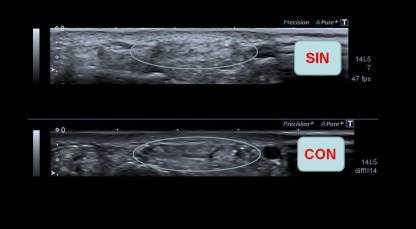
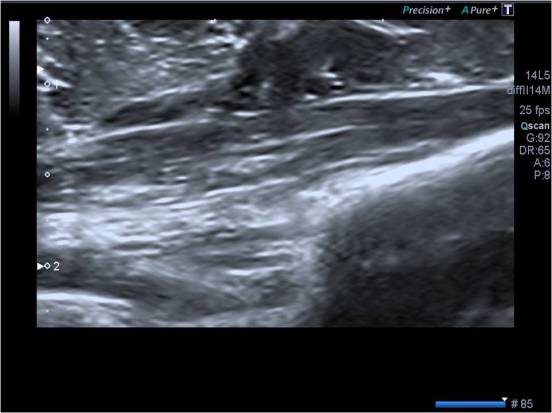
Imagen de alta frecuencia con y sin armónicos.

Las diferencias en algunos estudios son extremadamente llamativas, pudiendo llegar a diferenciar estructuras usando este ajuste que con la imagen fundamental se observan dificultosamente. En la imagen anterior, Tendón extensor común de los dedos de la mano. Misma imagen sin y con armónicos. Juzgar vosotros.

The differences in some studies are extremely striking, being able to differentiate structures using this adjustment that with the fundamental image are observed difficultly. In the previous image, Tendon extensor common of the fingers of the hand. Same image without and with harmonics. Judge you.
Observa las diferencias entre las dos imágenes.

En la imagen vemos dos imágenes, observamos que la nitidez y la definición de las estructuras es mucho mayor con armónicos que sin ellos.

Los armónicos es un ajuste implementado gracias al avance y la investigación de las casas comerciales en pos de conseguir una imagen mejor. Ya suelen estar integrados en los presets que vienen de fábrica o en la configuración personal que nos ofrece el técnico de aplicaciones cuando nos instala el equipo, una labor vital, por cierto.

Podemos explicar que los armónicos son, ecos de retorno múltiplos de la frecuencia transmitida en origen y que se debe a una propagación de la onda de ultrasonidos donde el componente de alta presión o compresión se transmite más rápidamente que el componente negativo o rarefacción.

Como esta explicación resulta bastante dura, pero no hay otra, puesto que es física pura, vamos a centrarnos en lo que importa en la práctica y que son sus ventajas, las mismas que a continuación te presento esquemáticamente.

In the image we see two images, we observe that the clarity and definition of the structures is much greater with harmonics than without them. The harmonics is an adjustment implemented thanks to the advance and research of the commercial houses in pursuit of achieving a better image. They are usually integrated in the presets that come from the factory or in the personal configuration that the application technician offers us when he installs the equipment, a vital task, by the way. We can explain that harmonics are return echoes multiples of the frequency transmitted at origin and that is due to a propagation of the ultrasound wave where the component of high pressure or compression is transmitted faster than the negative component or rarefaction. As this explanation is quite hard, but there is no other, since it is pure physics, we are going to focus on what matters in practice and what are its advantages, the same ones that I present here schematically.
  • Reducen los artefactos y aumentan la resolución.
  • Los armónicos o frecuencia armónica mejora la imagen respecto de la frecuencia fundamental, ya que esta debida a las interfases puede resultar poco resolutiva
  • Utilizaremos armónicos cuando la imagen fundamental no sea suficientemente buena.
  • Es una imagen más nítida ya que “limpia” la imagen fundamental.
  • En frecuencias altas ofrece una gran calidad de imagen.
  • Con los armónicos reducimos el moteado.
  • They reduce the artifacts and increase the resolution.
  • The harmonics or harmonic frequency improves the image with respect to the fundamental frequency, since this due to the interfaces can be not very resolutive
  • We will use harmonics when the fundamental image is not good enough.
  • It is a sharper image because it «cleans» the fundamental image.
  • In highs frequencies it offers a great image quality.
  • With the harmonics we reduce the mottling.

El moteado es un factor de degradación de la imagen producido por la dispersión de ultrasonidos de pequeños reflectores o pequeñas interfases, mostrando una imagen con un grano característico. En estas pequeñas interfases se producen ecos de retorno que ensucian la imagen y no aportan información porque una parte de los ecos de retorno producidos en las interfases ni siquiera llega al transductor, los eliminamos y nos queda una imagen mejor.

No confundamos, para ir terminando, armónicos con filtros porque no es lo mismo, el armónico es una representación selectiva de los mejores ecos de retorno. Dependiendo del equipo, normalmente de su gama, podemos disfrutar de varios tipos de armónicos.

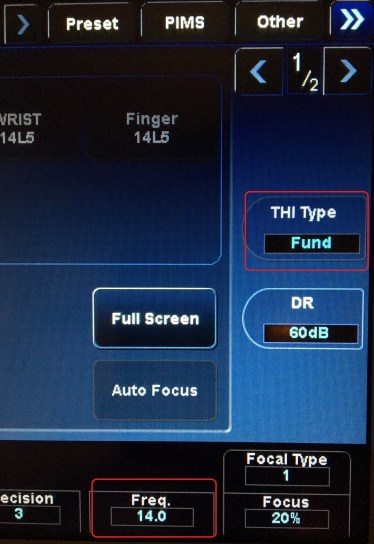
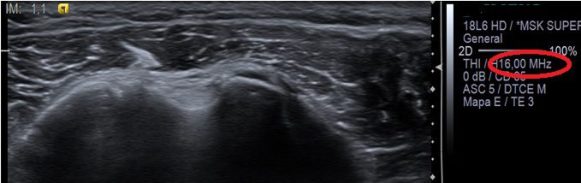
En la pantalla la imagen armónica se identifica habitualmente dependiendo de la casa comercial acompañando al valor de la frecuencia alguna letra o palabra, en la imagen fundamental, la frecuencia aparecerá como un valor numérico solitario (últimas imágenes).

Los armónicos deben estar siempre a disposición del operador, y se identifican en muchas marcas como THI o tissue harmonic imaging. El uso de los armónicos no es obligatorio, pero recomendable. Siempre asociando su uso a las características del paciente y del estudio.

Mottle is a factor of degradation of the image produced by the scattering of ultrasound of small reflectors or small interfaces, showing an image with a characteristic grain. In these small interfaces return echoes are produced that dirty the image and do not provide information because a part of the return echoes produced at the interfaces does not even reach the transducer, we eliminate them and we have a better image. Let’s not confuse, to finish, harmonics with filters because it is not the same, the harmonic is a selective representation of the best return echoes. Depending on the equipment, normally of its range, we can enjoy several types of harmonics. In the screen the harmonic image is usually identified depending on the commercial house accompanying the value of the frequency some letter or word, in the fundamental image, the frequency will appear as a solitary numerical value (last images). Harmonics must always be available to the operator, and are identified in many brands as THI or tissue harmonic imaging. The use of harmonics is not mandatory, but recommended. Always associating its use with the characteristics of the patient and the study.
Observar en recuadro rojo el tipo de armónico y su valor numérico con las letras.
Imagen fundamental y valor de frecuencia en solitario.


21. La Frecuencia.

La Frecuencia es sin duda el ajuste ecográfico más importante desde el punto de vista técnico a la hora de hacer una ecografía, es el eslabón más importante de la cadena que forman los «5 fantásticos» que son en mi opinión, la Ganancia General, la Ganancia Parcial, el Foco, la Profundidad y la mencionada Frecuencia. Manejando estos 5 parámetros podemos estar seguros de que si los usamos correctamente, nuestra imagen será diagnóstica, claro está, si sabemos como realizar los cortes de la estructura anatómica a estudio.

Este ajuste lo enlazamos https://ecografiafacil.com/2017/12/14/4-magnitudes-de-la-onda-ultrasonica-la-frecuencia/ con este episodio donde hablábamos de modo más abstracto de esta magnitud, pero que son la misma cosa. En ese episodio decía que según las frecuencia utilizadas en los ecógrafos que usamos para realizar los estudios, utilizaremos diferentes transductores o sondas ecográficas para llevar a cabo dichos estudios, me explico…

Si utilizamos frecuencias bajas (entre 2 y 6 MHz), tenemos que usar una sonda cónvex, y estudiaremos estructuras con profundidades grandes, Abdómenes y Ginecológicas.

Si usamos frecuencias altas (entre 10 y 18 MHz), utilizamos sonda lineal y serán objeto de estudio estructuras superficiales como, Músculos, Tendones, Ligamentos, Partes Blandas, Tiroides y Cuello, estructuras vasculares superficiales, Testes, Mama, Ojos, etc…Muy versátiles, por tanto, estas frecuencias altas. Incluso, podemos usar éstas en ecografía pediátrica, si la/el paciente es suficientemente pequeño, por ejemplo, es muy normal realizar ecografía de Caderas, Transfontanelar y Abdomen a bebés, y estas frecuencias altas son ideales.

¿Pero qué logramos en realidad usando una u otra frecuencia? Debemos partir de la base que siempre debemos usar la mayor frecuencia posible para obtener la imagen con máxima resolución posible.

Para realizar el estudio de un músculo, por ejemplo, usaremos, dentro de las frecuencias altas, la más alta si el músculo es muy superficial, pero si el músculo es más profundo y/o el paciente es muy voluminoso quizá sea bueno bajar un salto de frecuencia, así ganaremos un poco más de visión profunda aunque perdamos un poco de resolución o nitidez.

This adjustment is linked to https://ecografiafacil.com/2017/12/14/4-magnitudes-of-the-onda-ultrasonica-la-frecuencia/ with this episode where we talked in a more abstract way of this magnitude, but which are the same thing. In that episode he said that according to the frequency used in the ultrasound machines that we use to carry out the studies, we will use different transducers or sonographic probes to carry out these studies, I mean … If we use low frequencies (between 2 and 6 MHz), we have to use a convex probe, and we will study structures with large depths, abdomens and gynecology. If we use high frequencies (between 10 and 18 MHz), we use linear probe and will study superficial structures such as muscles, tendons, ligaments, soft parts, thyroid and neck, superficial vascular structures, testes, breast, eyes, etc. . Very versatile, therefore, these high frequencies. We can even use these in pediatric ultrasound, if the patient is small enough, for example, it is very normal to perform ultrasound of hips, transfontanel and abdomen to babies, and these high frequencies are ideal. But what do we actually achieve by using one or the other frequency? We must start from the base that we should always use as often as possible to obtain the image with maximum possible resolution. To perform the study of a muscle, for example, we will use, within the high frequencies, the highest if the muscle is very superficial, but if the muscle is deeper and / or the patient is very voluminous, it may be good to jump down of frequency, this way we will gain a little more of deep vision although we lose a little resolution or clarity.
Diferencias de nitidez. Frecuencias altas.

En la imagen superior observamos dos imágenes idénticas del Tendón extensor común de los dedos de la mano (flecha amarilla) estudiado con sonda de alta frecuencia y donde en la imagen superior se observa en recuadro rojo que se emplean 12 MHz y en la inferior, la misma estructura (flecha verde) estudiada con 7 MHz. Nótese la abrumadora diferencia de nitidez de la imagen superior.

Dentro de las frecuencias altas y bajas podemos elegir entre varias, eso es debido al Ancho de Banda…Es decir, para frecuencias bajas, por ejemplo para hacer un abdomen, usaré frecuencia de 3 mHz si en paciente es obeso (mucha profundidad) y 5 mHz si el paciente es muy delgado (poca profundidad), o de otra manera, mi sonda cónvex (baja frecuencia) puede usar varias frecuencias bajas en función de las necesidades del estudio. De otro modo, el ancho de banda es una horquilla de frecuencias que puedo usar dentro de un tipo de frecuencias, bien sean altas o bajas. Un ejemplo de esto lo tenemos en las imágenes siguientes.

In the upper image we observed two identical images of the common extensor tendon of the fingers of the hand (yellow arrow) studied with high frequency probe and where in the upper image it is observed in red box that 12 MHz are used and in the lower one, the same structure (green arrow) studied with 7 MHz. Note the overwhelming difference in sharpness of the upper image.
Within the high and low frequencies we can choose among several, that is due to the Bandwidth … That is, for low frequencies, for example to make an abdomen, I will use a frequency of 3 mHz if the patient is obese (a lot of depth) and 5 mHz if the patient is very thin (shallow), or otherwise, my convex probe (low frequency) can use several low frequencies depending on the needs of the study. Otherwise, the bandwidth is a fork of frequencies that I can use within a type of frequencies, either high or low. We have an example of this in the following images.
3 MHz.
5 MHz.

Otro ejemplo…para hacer un hombro, usaré frecuencia alta de 12 mHz si en paciente es muy musculoso (mucha profundidad) y 18 mHz si el paciente es muy delgado (poca profundidad), o de otra manera, mi sonda lineal (alta frecuencia) puede usar varias frecuencias altas en función de las necesidades del estudio.

Por ejemplo en algunas patologías es muy útil el cambio de frecuencias, por ejemplo en los hígados con Esteatosis Hepática donde no se observa bien los planos más profundos del órgano afectado. En la imagen siguiente podemos ver como disminuyendo la frecuencia ganamos poder de penetración pudiéndose observar en la profundidad con más claridad la interfase producida por el diafragma (línea blanca hiperecogénica o brillante).

Another example … to make a shoulder, I will use a high frequency of 12 mHz if the patient is very muscular (very deep) and 18 mHz if the patient is very thin (shallow), or otherwise, my linear probe (high frequency) can use several high frequencies depending on the needs of the study. For example, in some diseases it is very useful to change frequencies, for example in livers with Hepatic steatosis where the deeper planes of the affected organ are not well observed. In the following image we can see how decreasing the frequency we gain penetration power being able to observe in the depth with more clarity the interface produced by the diaphragm (hyperechogenic or bright white line).

En el equipo la presentación de este ajuste puede estar en la botonera o en la pantalla táctil, en casi todos los equipos ya se incorpora en esta última apariencia. Además esa frecuencia puede aparecer con un valor numérico o con grados de poder de penetración, como en las imágenes de a continuación.

In the equipment the presentation of this adjustment can be in the keypad or on the touch screen, in almost all the equipment is already incorporated in this last appearance. In addition, this frequency can appear with a numerical value or with degrees of penetration power, as in the images below.
Frecuencia con valor numérico.
Frecuencia con valor según poder de penetración.

En función del grado de penetración, tendremos «Penetración» para las frecuencias bajas dentro del ancho de banda correspondiente a esa sonda y «Resolución», para frecuencias altas dentro de esa misma sonda, el punto intermedio se queda para «General».

Si el valor fuese numérico, lo veremos reflejado en la pantalla, como en la imagen siguiente…

Depending on the degree of penetration, we will have «Penetration» for the low frequencies within the bandwidth corresponding to that probe and «Resolution», for high frequencies within that same probe, the intermediate point stays for «General». If the value were numeric, we will see it reflected on the screen, as in the following image …
En rojo, rodeado el valor de la frecuencia usada.

Es un parámetro dependiente del operador, del Técnico en nuestro caso, su buen uso relanza la calidad del estudio.

Por tanto y para terminar este denso pero importantísimo capítulo, resumimos con dos frases que deben ser grabadas para cualquiera que se precie de sentarse delante de un ecógrafo…y son…

Si aumentamos la frecuencia tendremos menor poder de penetración pero mayor resolución.

Si disminuimos la frecuencia tendremos mayor poder de penetración pero menor resolución.

Además, la elección de la frecuencia correcta la marca las características físicas de cada paciente, cuando mas grueso sea, menos frecuencia debemos emplear.

It is a parameter dependent on the operator, the Technician in our case, its good use re-launches the quality of the study. Therefore and to finish this dense but very important chapter, we summarize with two phrases that should be recorded for anyone who claims to sit in front of an ultrasound … and they are … If we increase the frequency we will have less penetration power but higher resolution. If we decrease the frequency we will have greater penetration power but lower resolution. In addition, choosing the correct frequency marks the physical characteristics of each patient, the thicker it is, the less frequently we should use it.

20. Medidas.

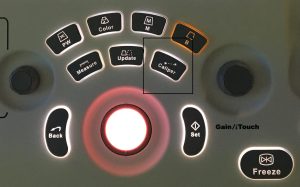
Os voy a hablar hoy de las medidasEl botón de medida o caliper, no es en si mismo un ajuste ecográfico, pero está integrado en la botonera y su uso y su función es muy importante porque nos va a permitir conocer cuales son las proporciones de las estructuras que estamos estudiando o las velocidades de la sangre en los estudios vasculares.

En algunos equipos esta función puede aparecer directamente en la pantalla, pero lo normal es que aparezca en la botonera, es, desde un aspecto de vista funcional, mucho más práctico, pero esto es una opinión personal.

I am going to talk about the measurements today … The measure button, or caliper, is not an echographic adjustment in itself, but it is integrated in the keypad and its use and function is very important because it will allow us to know which are the proportions of the structures that we are studying or the velocities of the blood in the vascular studies. In some teams this function can appear directly on the screen, but it is normal to appear on the keypad, it is, from a functional aspect, much more practical, but this is a personal opinion.

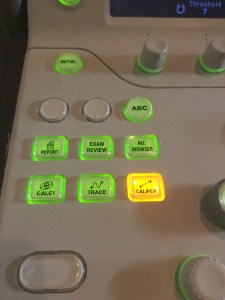
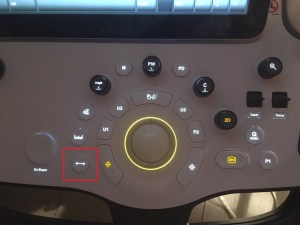
En estas tres imágenes anteriores vemos los diferentes aspectos que pueden tomar esta función y que cada marca comercial implementa según su criterio.

No es un ajuste ecográfico porque no afecta a la calidad de la imagen. Pero la verdad, es tan importante en el día a día que, en mi opinión, merece estar aquí.

Suele aparecer en la botonera cerca de Trackball, nos vamos a valer del Trackball para poder manejar los comandos del medidor en la pantalla por lo que ambas funciones, medidas y trackball están íntimamente relacionadas.

In these three previous images we see the different aspects that this function can take and that each commercial brand implements according to its criteria. It is not an ultrasound adjustment because it does not affect the quality of the image. But the truth is that it is so important in the day to day that, in my opinion, it deserves to be here. It usually appears in the keypad near Trackball, we will use Trackball to be able to handle the meter commands on the screen, so both functions, measurements and trackball are closely related.
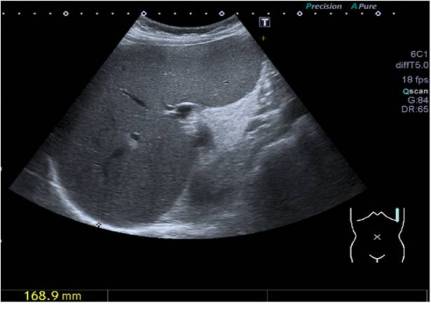
Medida de un Bazo.

Cuando tenemos una estructura que queremos medir, por ejemplo, el tamaño del Bazo, vamos a localizar la imagen, después vamos a congelarla y si nos gusta, procedemos a hacer una medida. Para ello pulsaremos el botón de medidas, en la pantalla aparecerá un comando en forma de «+» o de «*» o de alguna forma similar, llevaremos con el trackaball ese comando hasta el principio de la estructura que queramos medir, pulsaremos el botón de «SET» o botón de función idéntica aunque no tenga este nombre (marcas comerciales) que habitualmente está junto a trackball, fijando ese primer comando y desplazamos otro signo igual que el que hemos utilizado y que aparece al pulsar «SET» hasta el punto final de la estructura a medir, otra vez, como no, con el trackball. Nos aparecerá en pantalla una medida, correspondiente a la medida de la estructura a estudio. Fácil.

El ejemplo de la foto anterior observamos un bazo medido y su medida abajo a la izquierda de la imagen.

Podemos repetir esto tantas veces como deseemos volviendo a pulsar el botón de medida.

When we have a structure that we want to measure, for example, the size of the Spleen, we will locate the image, then we will freeze it and if we like it, we proceed to make a measurement. For this we will press the button of measures, in the screen it will appear a command in the form of «+» or of «*» or in some similar way, we will take with the trackaball that command until the beginning of the structure that we want to measure, we will press the button «SET» or identical function button even if it does not have this name (trademarks) that is usually next to trackball, setting that first command and move another sign like the one we used and that appears when you press «SET» to the point end of the structure to be measured, again, of course, with the trackball. A measure will appear on the screen, corresponding to the size of the study structure. Easy. The example in the previous photo shows a measured spleen and its measurement at the bottom left of the image. We can repeat this as many times as we wish by pressing the measurement button again.
Medidas de un estudio vascular.

En la imagen anterior, la medida de la velocidad en una arteria en un estudio Doppler de TSA.

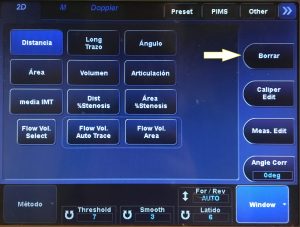
Cuando pulsamos el botón de medida, en la pantalla táctil de los ecógrafos más modernos suele desplegarse un submenú con las funciones que alberga dentro de si el botón de medida, por ejemplo, medida de volumen, para las próstatas, medidas de indices de resistencia para estudio vasculares, medidas de áreas, las más usadas y un largo etcétera de sub-funciones que por norma general son de uso ocasional. Por ejemplo la foto que observas a continuación.

In the previous image, the measurement of the velocity in an artery in a Doppler study of TSA. When we press the measurement button, on the touch screen of the most modern echographs, a submenu is usually displayed with the functions that it houses inside the measurement button, for example, measurement of volume, for prostates, measures of resistance indices for vascular studies, measurements of areas, the most used and a long etcetera of sub-functions that as a rule are for occasional use. For example, the photo you see below.

En esta imagen observamos que en el modo 2D podemos ejecutar estas acciones dentro de la función de medir. El el modo Doppler, tendremos otro submenú con tareas específicas de la función de medir y que se usarán en estudios de vascular y en el modo M, para cardio, pero os digo que en este caso es la presentación de una marca comercial, otras implementarán estas acciones de manera similar, pero no igual.

Cuando medimos distancias lo haremos en centímetros, por ejemplo, en el Bazo que has visto antes, pero en estudios vasculares mediremos en cm/s ya que medimos velocidades y no distancias.

En la imagen, observamos, señalada con flecha blanca, la palabra «Borrar», es obvio que si nos equivocamos al ejecutar una medida, podamos borrarla para realizarla correctamente.

Hoy hemos tratado un tema «amable», fácil de entender y de usar, te invito a que te suscribas al Blog y así poder seguir cada nuevo Post, te advierto, el próximo será muy, muy interesante…será muy didáctico.

In this image we observe that in the 2D mode we can execute these actions within the function of measuring. In the Doppler mode, we will have another submenu with specific tasks of the function to measure and that will be used in studies of vascular and M-mode, for cardio, but I tell you that in this case it is the presentation of a commercial brand, others will implement These actions similarly, but not the same. When we measure distances we will do it in centimeters, for example, in the Spleen that you have seen before, but in vascular studies we will measure in cm / s since we measure speeds and not distances. In the image, we observe, marked with a white arrow, the word «Delete», it is obvious that if we make a mistake when executing a measurement, we can erase it to perform it correctly. Today we have treated a «friendly» theme, easy to understand and use, I invite you to subscribe to the Blog and thus be able to follow each new Post, I warn you, the next one will be very, very interesting … it will be very educational.

19. El foco.

También conocido como enfoque, es una herramienta vital en día a día. Es el ajuste ecográfico que vamos a utilizar para ver con mayor nitidez aquella parte de la pantalla en la que tenemos la estructura que nos interesa estudiar. Es decir, imagina que estamos utilizando una profundidad de 12 centrímetros en el estudio de un hígado, pero ese hígado tiene en la parte mas superficial de la pantalla, como a 4 centímetros de la piel, una estructura sospechosa, una lesión, que necesito estudiar con más cuidado, lo que voy a hacer es llevar el foco a la profundidad de 4 centrímetros para ver con mayor resolución, con mayor nitidez,  en esa parte de la imagen, eso conllevará una resolución menor en otras profundidades de la imagen, tanto mayores como menores.

Si no objetivamos nada particular en la imagen que debamos estudiar, tendremos el foco colocado en aquella zona donde observemos la imagen globalmente, lo más nítida posible, suele ser en la zona central de la profundidad, siempre que ésta esté acorde con la zona de estudio, como expliqué en el capítulo anterior.

Also known as focus, it is a vital tool on a day-to-day basis. It is the ultrasound adjustment that we are going to use to see more clearly that part of the screen in which we have the structure that we are interested in studying. That is, imagine that we are using a depth of 12 centimeters in the study of a liver, but that liver has in the most superficial part of the screen, about 4 centimeters from the skin, a suspicious structure, an injury, that I need to study more carefully, what I’m going to do is take the focus to the depth of 4 centimeter to see with higher resolution, with greater clarity, in that part of the image, that will lead to a lower resolution in other depths of the image, both higher as minors. If we do not objectify anything particular in the image that we must study, we will have the focus placed in that area where we observe the image globally, as clearly as possible, usually in the central area of ​​the depth, as long as it is in accordance with the study area , as I explained in the previous chapter.
Foco o Focus, junto a Profundidad o Depth
Aspecto de rueda pequeña superior al Trackball.

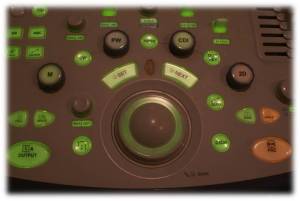
El foco es un comando que puede tener diferentes aspectos en la botonera, puede ser una pequeña rueda, en la imagen anterior, entre las teclas SET y NEXT. Puede ser una tecla que se pueda accionar arriba y abajo, debe estar siempre cerca de la profundidad, a mi me gusta que sea así, porque su uso está bastante relacionado.

The focus is a command that can have different aspects in the keypad, it can be a small wheel, in the previous image, between the SET and NEXT keys. It can be a key that can be operated up and down, it must always be close to the depth, I like it to be that way, because its use is quite related.
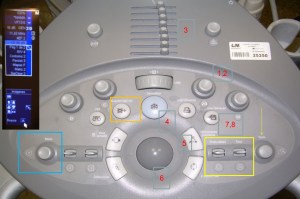
Foco y profundidad en rectángulo amarillo.

Este ajuste está íntimamente relacionado con la propagación del haz ultrasónico y sus partes https://ecografiafacil.com/2017/12/23/9-el-haz-ultrasonico/.

En ese capítulo veíamos que justo antes de la divergencia del haz había una zona conocida como «zona focal», esa zona la podemos modificar para corregir la divergencia del haz y poder ver con mayor nitidez en la profundidad de la pantalla, por ejemplo.

El foco o enfoque tiene que estar siempre en la línea de interés o un poco por debajo de ella.

Los equipos de ecografía cuanto mejores son, más foco dependientes son, es decir, que tengamos un equipo de alta gama no nos evita la utilización de este ajuste, sino que en la práctica, puedo asegurar que es más efectivo y necesario.

This adjustment is closely related to the propagation of the ultrasonic beam and its parts https://ecografiafacil.com/2017/12/23/9-el-haz-ultrasonico/. In that chapter we saw that just before the divergence of the beam there was an area known as «focal area», that area can be modified to correct the divergence of the beam and be able to see more clearly in the depth of the screen, for example. The focus or focus must always be on the line of interest or a little below it. The sonography equipment the better they are, the more dependent they are, that is to say, that we have a high-end equipment does not prevent us from using this adjustment, but in practice, I can assure that it is more effective and necessary.
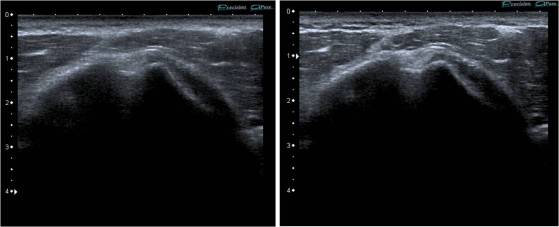
Colocación óptima del foco mejora la imagen en zona de interés.

En las imágenes anteriores se demuestra mejor visualización del Tendón del Biceps en la corredera bicipital si situamos el foco a su altura, más nítido que si situamos el foco en la profundidad de la imagen.

Su aspecto en pantalla suele ser un triángulo blanco junto a la línea centimetrada de la profundidad, pueden ser varios focos a la vez los que utilicemos, de manera que «enfoquemos» mejor en varias zonas de la pantalla, pero esto lógicamente tiene un precio, que es el refresco de la pantalla, es decir, vamos a hacer que tengamos menos imágenes por segundo en pantalla y podamos observar que la imagen va como a «saltos», como cuando vemos una película en fotogramas…eso en la práctica agota y por eso se recomienda el uso de un solo foco, en la zona de interés.

In the previous images, better visualization of the Biceps Tendon in the bicipital slider is shown if we place the focus at its height, more clear than if we place the focus in the depth of the image. Its appearance on the screen is usually a white triangle next to the centimeter line of the depth, there may be several bulbs at the same time that we use, so that we «focus» better in several areas of the screen, but this logically has a price, which is the refresh of the screen, that is, we are going to have less images per second on the screen and we can observe that the image goes as «jumps», as when we see a film in frames … that actually exhausts and for that reason the use of a single focus is recommended, in the area of ​​interest.
2 focos en pantalla, a casi 1 cm y a 2 cms. Obsérvese el triángulo blanco a dos alturas.

Este ajuste se usa también en otros modos de imagen, como el doppler, no es exclusivo del Modo «B» o «2D».

Es un ajuste de uso exclusivo del operador…y es esencial su conocimiento con el objetivo de conseguir la mejor imagen posible, con la mayor nitidez en la zona de interés.

This setting is also used in other image modes, such as the Doppler, it is not exclusive to the «B» or «2D» mode. It is an adjustment for the exclusive use of the operator … and his knowledge is essential in order to achieve the best possible image, with the greatest clarity in the area of ​​interest.

18. La Profundidad.

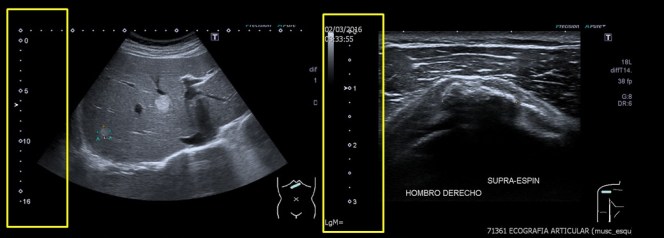
La profundidad es un ajuste ecográfico en el cual vamos a poder controlar la distancia a la que queremos trabajar o la distancia que necesitamos en centímetros para estudiar aquella estructura que deseemos. Por ejemplo, usaremos profundidades muy diferentes para estudiar un tendón supraespinoso o de un hígado.

Para estudios superficiales como pueden ser ecografías musculares o de partes blandas emplearemos profundidades pequeñas de máximo 4 cms para un paciente estándar, pero para estudiar el Abdomen de un adulto necesitamos perentoriamente utilizar profundidades de unos 15 cms…

The depth is an ultrasound adjustment in which we will be able to control the distance we want to work or the distance we need in centimeters to study that structure we want. For example, we will use very different depths to study a supraspinatus or a liver tendon. For superficial studies such as muscle or soft tissue ultrasounds we will use small depths of maximum 4 cm for a standard patient, but to study the abdomen of an adult we need to use depths of approximately 15 cm.
Imágenes de Hígado y Tendón del Supraespinoso y sus profundidades de estudio en rectángulo amarillo.

Bien, esto es fácil de entender, pero este tipo de distancias se acompañan de la elección de sondas ecográficas que nos den la imagen correcta para cada estudio…cuando hablamos de los tipos de transductores, dijimos que los lineales eran de alta frecuencia y los cónvex de baja frecuencia. En el siguiente enlace puedes consultar esta información. https://ecografiafacil.com/2018/01/01/11-tipos-de-transductores/

Por tanto, para técnicas que requieran estudios de poca profundidad usaremos sondas de alta frecuencia y para estudios de más profundidad, usaremos sondas de baja frecuencia.

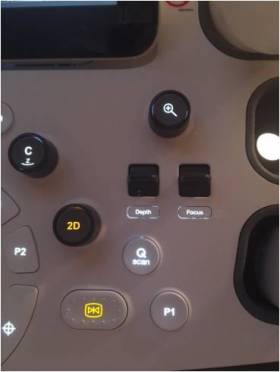
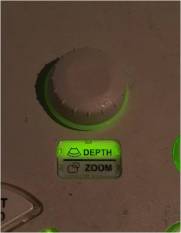
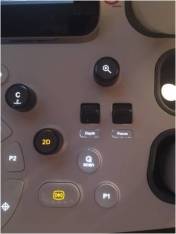
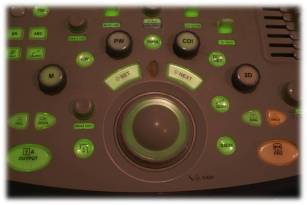
Este ajuste suele estar situado en la botonera a la derecha del trackball y el freezer, se puede identificar en ingles como «Depth» y suele situarse junto al foco, otro ajuste de gran importancia y que estudiaremos muy próximamente. En algunas marcas como Toshiba, este ajuste se integra en el mismo botón con el Zoom y no se deben de confundir, en otras marcas como Samsung, están separados como puedes ver en las fotos expuestas a continuación.

Well, this is easy to understand, but this type of distance is accompanied by the choice of ultrasound probes that give us the correct image for each study … when we talk about the types of transducers, we said that the linear ones were of high frequency and the low frequency convex. In the following link you can check this information. https://ecografiafacil.com/2018/01/01/11-tipos-de-transductores/ Therefore, for techniques that require shallow studies we will use high frequency probes and for deeper studies, we will use low frequency probes. This adjustment is usually located in the keypad to the right of the trackball and the freezer, can be identified in English as «Depth» and is usually placed next to the focus, another adjustment of great importance and we will study very soon. In some brands like Toshiba, this setting is integrated in the same button with the Zoom and should not be confused, in other brands such as Samsung, are separated as you can see in the photos shown below.

En las dos primera imágenes vemos ambas funciones y un solo botón, en la tercera un botón negro con una lupa con un + dentro y abajo la tecla «Depth», funciones separadas.


Debemos diferenciar profundidad y zoom. Profundidad es la distancia que necesitamos ver para llevar a cabo un estudio y el zoom se usa para captar una imagen en unas condiciones y mediante la aplicación de un software, realizar un aumento, «inventando» píxeles inexistentes a partir de otros que se han recogido. Es como hacer una foto, donde la distancia sería el tamaño de pantalla que necesitamos para meter dentro un atardecer en el mar y el zoom sería una imagen, ampliada a posteriori, sólo del sol…solo que en ecografía, el zoom puede usarse en tiempo real. Por tanto, siempre tendremos más calidad de imagen usando la profundidad y no el zoom, siendo este último de uso específico para ampliar alguna estructura en particular.

Si cambiamos la profundidad modificamos la velocidad de refresco de la pantalla, sabremos más de esto más adelante, no es lo mismo escanear 5 cms que 20 cms.

In the first two images we see both functions and a single button, in the third a black button with a magnifying glass with a + inside and below the «Depth» key, separate functions. We must differentiate depth and zoom. Depth is the distance we need to see to carry out a study and zoom is used to capture an image in some conditions and by applying software, make an increase, «inventing» nonexistent pixels from others that have been collected . It’s like taking a picture, where the distance would be the screen size we need to put a sunset in the sea and the zoom would be an image, enlarged a posteriori, only from the sun … only in ultrasound, the zoom can be used in real time. Therefore, we will always have more image quality using depth and not zoom, the latter being of specific use to extend some particular structure. If we change the depth we modify the refresh rate of the screen, we will know more about it later, it is not the same to scan 5 cm than 20 cm.


17. Freezer y Cine.

En este post vamos a tratar dos ajustes ecográficos muy usados, uno de ellos el que más, que es el Freezer o congelador de la imagen y que va acompañado del Cine que es un ajuste que sin ser tan usado, su utilidad es muy relevante, sobre todo en alguna técnica ecográfica donde el paciente no sea colaborador…empezamos…

El congelador o freezer es el botón más usado de la botonera de control del ecógrafo. Cada vez que queramos hacer una foto vamos a congelar la imagen para verla detenida en pantalla y ver si es correcta para almacenar.

In this post we are going to discuss two very used echographic adjustments, one of them the most, which is the Freezer or Freezer of the image and that is accompanied by the Cinema that is an adjustment that without being so used, its usefulness is very relevant, especially in some ultrasound technique where the patient is not a collaborator … we started … The freezer or freezer is the most used button of the control panel of the ecograph. Every time we want to take a picture we will freeze the image to see it stopped on screen and see if it is correct to store.
Marca 1.Botón azul grande por encima del trackball con icono de copo de nieve.
Marca 2.Botón grande anaranjado abajo a la derecha de la imagen.
Marca 3.Botón grande anaranjado abajo a la derecha de la imagen.


Suele tener un aspecto principal en la botonera, suele ser más grande y llamativo, estará centrado o ligeramente tirado a la derecha, cerca siempre del trackball. Como vemos en las tres imágenes anteriores de tres marcas diferentes.

Cuando congelamos la imagen no solo paramos la imagen en la pantalla, también hacemos que los cristales del transductor se queden en pausa y por tanto dejen de trabajar, cuestión muy importante para su conservación duradera, recomendamos encarecidamente que cuando el equipo no esté usándose, por ejemplo, entre paciente y paciente, que el freezer esté activado (imagen parada) para que los cristales no trabajen y la pantalla tampoco. Esta función del freezer es mayúscula.

Es el botón que más se usa, fácil de entender, porque cada imagen que queramos guardar activaremos esta función, aunque algunas veces esa imagen no sea válida y tengamos que volver a descongelar.

Cuando nuestro ojo ve en pantalla una imagen que quiere guardar y nuestro cerebro le da la orden a nuestro dedo para congelar la imagen, pasan décimas de segundo que el paciente, por ejemplo un bebé, puede aprovechar para moverse y hacer que la imagen que queríamos ya no aparezca en la pantalla…¿Por qué razón cuento esto? Esta cuestión viene a colación del segundo ajuste del día de hoy, el cine…

El cine es un ajuste que permite revisar una serie de imágenes que el ecógrafo ha ido guardando previamente antes de pulsar el congelador con objeto de poder «rebobinar» y volver hacia atrás para encontrar la imagen que mi ojo había visto, seleccionarla y poder hacer la foto deseada antes de que el bebé de nuestro ejemplo se hubiese movido…es un ajuste genial¡¡¡

En algunos ecógrafos este ajuste está integrado en la botonera, pero otras veces es un ajuste automático que se activa al pulsar el botón de freezer y es el trackball el que asume esta función.

¿Pero cuantas imágenes puedo guardar? Desgraciadamente solo podemos guardar unas cientos de imágenes, eso es a penas unos segundos antes de apretar el botón de freezer ya que la imagen ecográfica que vemos en la pantalla es la representación de una gran superposición de imágenes que se van refrescando automáticamente, pero esta cuestión la abordaremos más adelante.

Estas cientos de imágenes que puedo guardar son más que de sobra para lo que nos interesa ya que almacena varios segundos y por tanto varios decenas o cientos de imágenes.Eso sí, cuando volvamos a activar la imagen o a descongelarla, esas imágenes se perderán y volverán a almacenarse otras hasta que volvamos a pulsar de nuevo el congelador. Sólo se almacenan imágenes durante unos segundos previos a la activación del freezer, si pasan minutos entre uso y uso del freezer sólo se almacenan la imágenes que se han guardado unos segundos antes de pulsar el esta función.

It usually has a main aspect in the keypad, it is usually bigger and more striking, it will be centered or slightly pulled to the right, always close to the trackball. As we see in the three previous images of three different brands. When we freeze the image we not only stop the image on the screen, we also make the transducer glasses stand still and therefore stop working, a very important issue for its lasting conservation, we strongly recommend that when the equipment is not being used, example, between patient and patient, that the freezer is activated (stop image) so that the crystals do not work and the screen does not work either. This function of the freezer is capitalized. It is the button that is most used, easy to understand, because each image that we want to save will activate this function, although sometimes that image is not valid and we have to re-unfreeze it. When our eye sees an image on the screen that we want to save and our brain orders our finger to freeze the image, it takes tenths of a second for the patient, such as a baby, to take advantage of the movement to make the image we want no longer appears on the screen … Why do I tell this? This question comes to mind the second adjustment of today, the cinema … The cinema is a setting that allows reviewing a series of images that the ultrasound system has previously saved before pressing the freezer in order to «rewind» and go back to find the image that my eye had seen, select it and be able to do it. desired picture before the baby of our example had moved … it’s a great fit! In some echographs this adjustment is integrated in the keypad, but other times it is an automatic adjustment that is activated when the freezer button is pressed and it is the trackball that assumes this function. But how many images can I save? Unfortunately we can only save a few hundred images, that is hardly a few seconds before pressing the freezer button since the ultrasound image that we see on the screen is the representation of a large superposition of images that are refreshed automatically, but this question we will address it later.
These hundreds of images that I can save are more than enough for what interests us since it stores several seconds and therefore several tens or hundreds of images. That is, when we re-activate the image or defrost it, those images will be lost and will return to store others until we press the freezer again. Only images are stored for a few seconds before the freezer is activated, if minutes pass between the use and use of the freezer, only the images that have been stored for a few seconds are saved before pressing this function.

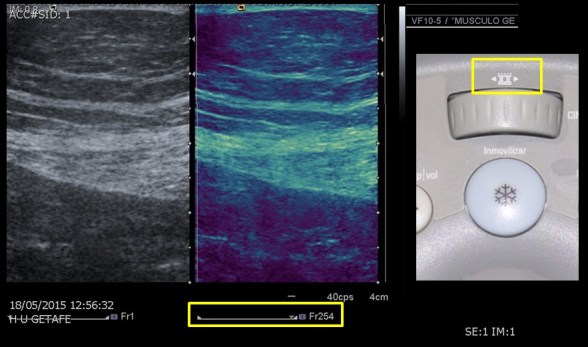
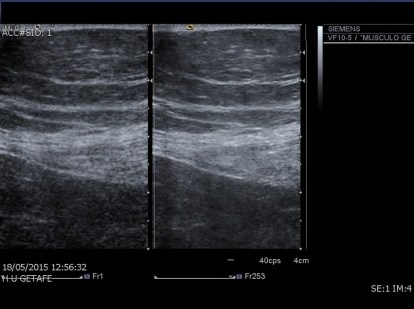
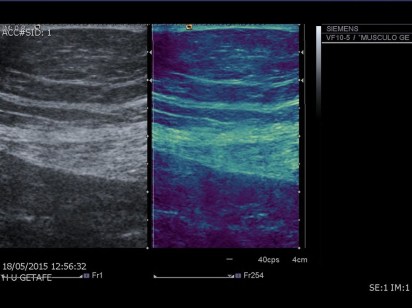
En la imagen vemos dos rectángulos amarillos. En el superior a la derecha es el del icono del cine que es la rueda que está justo debajo, integrado en la consola, justo superior al botón azul de congelar o inmovilizar la imagen. Repito, en esta marca, en otras, es una función asumida por el trackball.

Abajo y central, otro rectángulo que marca una serie de imágenes o frames (acostumbraros a esta terminología) y que marca un Fr254, que quiere decir que se ha escogido la imagen 254 de todas las que habían sido guardadas en la serie, que en este caso estaría en torno a 300 imágenes…

Ambas funciones son «operador-dependiente», es decir, es la persona que está realizando el estudio, el Técnico de Radiología, en nuestro caso, el encargado de manejar dichas funciones.

Nos vemos en el siguiente…

In the image we see two yellow rectangles. In the upper right is the icon of the cinema that is the wheel that is just below, integrated into the console, just above the blue button to freeze or immobilize the image. I repeat, in this brand, in others, it is a function assumed by the trackball. Bottom and center, another rectangle that marks a series of images or frames (accustomed to this terminology) and that marks a Fr254, which means that the image 254 of all those that had been saved in the series has been chosen, that in this case would be around 300 images … Both functions are «operator-dependent», that is, it is the person who is conducting the study, the Radiology Technician, in our case, the person in charge of handling said functions. See you in the next …